How to Make Job Card From Mobile?– To work in MNREGA, it is necessary to have a job card. All job card holders in rural areas get 100 days per year in MNREGA. Whose money is sent directly to the bank account. But most of the people do not know the process of making job card from mobile due to which they are not able to work as laborers in MNREGA. If you also want to know the process of making job card from mobile, then definitely watch till the end of this article.
In MNREGA, workers do not have to work for long hours and wages are paid as per the government rate. Many people from rural areas go to the city to work as laborers, hence the government has started a scheme to make job cards to provide employment to all the people in the villages. And the website has been launched with the idea that no one should have to visit the government office to get a job card made. So let us not take much time and explain step by step the process of making job card from mobile.
The government has not yet launched any website to make NREGA job card online. Therefore you will have to make job card offline which is explained in detail below.
First of all, to get a job card made, you have to ask the Sarpanch of your Gram Panchayat all the information about what documents are required.
After this, the application form has to be asked from the Sarpanch, then all the information asked in the form has to be filled clearly without cutting it.
If you do not know the process of filling the form, then get the form filled from the Employment Assistant or any knowledgeable citizen.
After this, all the necessary documents and forms have to be attached together and submitted to the Sarpanch of your Gram Panchayat.
Then after a few days your job card will be prepared and you will start getting employment, in this way you can get the job card made.
Summary :
To make a job card, first of all you have to obtain the application form for making a job card from the Sarpanch of your Gram Panchayat. After this, all the information asked in the form has to be filled clearly. After this, all the necessary documents and forms have to be attached together and submitted to the Sarpanch of your Gram Panchayat. In this way you can apply for the job and get employment in MNREGA for 100 days every year.
How many days of employment do you get through job card?
All job card holders in rural areas get 100 days of employment every year under MNREGA.
What documents are required to make a job card?
To make a job card, Aadhar card, ration card, bank account passbook, passport size photo, mobile number are required.
What is the website for online job card making?
The government has not yet launched the website to make job card online. So you will have to contact the Sarpanch of the Gram Panchayat to get the job card made.
Its entire process is explained here in simple words. Hope you guys have understood this information. And there will be no problem in making job card, if you do not understand the article then you can ask by commenting and you will get the correct answer immediately.
Similarly, we will keep giving you information about such new schemes in this website so that you can get benefits. This information is important for all the people of rural areas, please share it, thank you.
How to Make Job Card From Mobile, How to Make Job Card From Mobile, How to Make Job Card From Mobile,
Explore the information regarding SASSA Status Check for October 2023, including SRD R350 payment dates and bank details, in this article. Find comprehensive details on SASSA Status Check October 2023 SRD R350 Payment Dates, Bank Details, and other essential information right here.
Easily verify the status of different grants, including the R350 Grant, provided by the South African Social Security Agency through its official website. Registered beneficiaries in South Africa can conveniently check their SRD status using their ID Number and Phone Number.
SASSA allocates a monthly amount of R350 to selected beneficiaries, aiming to offer support to the citizens and families of South Africa, enabling them to fulfill their basic needs.
Beneficiaries can use the status-checking option to ascertain their SRD payment status, providing clarity on whether they have received the grant. Several user-friendly methods are available for citizens to check their SASSA status, including the official SASSA website, SMS/Toll-Free Numbers, or the mobile application.
SASSA Status -SRD R350 October 2023 Payment Dates, Bank Details
However, the beneficiaries must enter their registered mobile number and IDs at the time of checking the status. If the ID or Phone number doesn’t match with the registered credentials, the R350 status will not appear.
To check the SASSA Status from the website, follow these steps –
Go to the authorized website of the SASSA.
Click on the Status option and enter the registered ID and Phone Numbers.
An OTP will be sent to the registered phone number.
Enter the OTP to validate the session and submit it.
The SASSA Status will be generated.
The SRD status can be one of the following – Approved, Pending, or Declined. Approved means that the grant for a particular month has been approved by the SASSA.
Pending means that the authorities are still verifying details or they are processing the applications. In this case, the beneficiaries must wait for a little longer for the processing to be completed. Declined means that the grant for a particular month has been declined. This can happen due to various reasons.
SASSA Payment Dates October 2023
SASSA administers various beneficial grants for South African Citizens. These include SRD, Old Age, Disability, Child Support, War Veterans, etc. Recently, the SASSA announced the new payment dates for the month of October.
Grant Name
Date
Older Person’s Grants
October 3
Disability Grants
October 4
Children’s Grants
October 5
Firstly, the Older person’s grants will be issued on October 3. After this, the SASSA will issue disability grants on October 4. Finally, the Children’s grants will be missed on October 5. The beneficiaries can receive the grants in a number of ways, such as bank transfers, post office, pick-n-pay, etc.
SASSA Status
In addition, starting from October 1, there has been an increase in the amounts for several Grants issued by the SASSA. The Old Age (below 75) grant has been increased to 2090, whereas the Old Age (above 75) grant has been increased to 2110. In addition, Disability, War Veterans, Care Dependency, Foster Child, Grant in Aid, and Child Support are also increased.
SASSA SRD R350 Payment Dates 2023
The upcoming R350 monthly payment is set for October. SASSA will initiate the processing of all applications, ensuring thorough verification of the information submitted by beneficiaries. Subsequently, based on eligibility and provided information, they will determine whether to proceed with grant processing.
SASSA consistently releases payment dates and updates on the SRD R350 Grant. Beneficiaries can stay informed about the latest developments concerning the SRD R350 Grant by regularly checking the official SASSA website for updated information.
SASSA SRD Bank Details 2023
To apply for the SASSA SRD Grant, applicants are required to add their bank details. In case the bank details are not provided, SASSA cannot issue grants. They need the correct gateway to send the grants. In this case, the SASSA status will show bank details pending.
Moreover, the registered beneficiaries also have the option to update their payment or bank details. For this, they have to login to the authorized web portal of the SASSA using their correct credentials. i.e., ID Number and Phone Number.
How to Get Marksheet From Mobile? — The examinations of most of the students of the country have ended and the result is going to come very soon. Therefore, today we are going to tell you complete information about checking 10th and 12th class results through mobile. Many students do not know the process of checking results online due to which they make rounds to get the results checked. If you also want to check 10th, 12th results online, then definitely watch this article till the end.
There are many people in the country whose mark sheets get torn, or lost or stolen. And if necessary, they make rounds for several days to get the mark sheet issued. Keeping this in mind, the Madhya Pradesh government has launched a website. So that all the people of the state can get the marksheet sitting at home and along with this, they can easily check how many students have taken more mocks in the examination. So let us not take much time and explain the process of checking results from mobile step by step.
How to Get Marksheet From Mobile?
Process to check exam result online:
First of all, to check the marksheet from mobile, you have to open the government website mpbse.mponline.gov.in. If you want to go directly to the website then use this link
After this the website of Madhya Pradesh Education Board Department will open. In which you have to select the option of Counter Based Forms.
After this a new page will open, in which on going down there will be the option of Application Form at number 6 which has to be selected.
After this, the form to check marksheet will open in which class, Exam Type, Year, Roll No. And fill the captcha code shown in the picture and select the Get Document option.
After this, the mark sheet will open on your mobile screen, you can see its complete details and then select the download option and remove the duplicate mark sheet.
If you want to order marksheet online. So by choosing the payment option, you can order the mark sheet online after paying the charges.
In this way, you can check 10th and 12th class result online from mobile and can also order marksheet online.
To download 10th and 12th marksheet from mobile, you will have to open the government website mpbse.mponline.gov.in. After this, the option of Counter Based Forms has to be selected, then on the sixth number there will be the option of Application Form which has to be selected. After that class, Exam Type, Year, Roll No. Then after filling the captcha code and selecting the option of Get Document, the result will open in which you can download and print it after paying the payment charges. Marksheet can be retrieved from this mobile.
Madhya Pradesh government website mpbse.mponline.gov.in has to be opened by typing it in the search box of Google. Then you can easily check the result by choosing the option of Counter Based Forms.
How to get new mark sheet online?
If your mark sheet is lost or stolen, you can open the government website Counter Based Forms and get a new mark sheet from your mobile.
When will the 10th and 12th results come?
The government has not yet announced any date regarding the 10th and 12th board results, but the results of all board exams can be declared in May.
How to get marksheet from mobile? Its entire process is explained in detail here if you have read this article completely. So you can easily get your 10th and 12th result online. If you do not understand the method of extracting the marksheet, you can ask by commenting.
In this way, we will keep giving you information about such new schemes in this website so that you can get benefits. This article is important for all the students of Madhya Pradesh. Do share it if you want to get the first information about the new government scheme. So you can see by typing www.sarkariportal.online in Google’s search box. Thank you.
How to Get Marksheet From Mobile, How to Get Marksheet From Mobile, How to Get Marksheet From Mobile, How to Get Marksheet From Mobile, How to Get Marksheet From Mobile
UP URISE Portal Registration 2023 – Many schemes are launched by the government to promote the education of the students. URISE portal has been launched by the Government of Uttar Pradesh to promote education. Through this portal, students can study many types of courses online and can also take advantage of some schemes through this portal.
Today, through this article, we will tell you how to register on URISE portal, how to login urise student and give other important information, many other important schemes have been launched by the Uttar Pradesh government. Like – UP Ration Card, UP Seva Yojana, UP Public Hearing, Uttar Pradesh Kanya Sumangala Yojana etc.
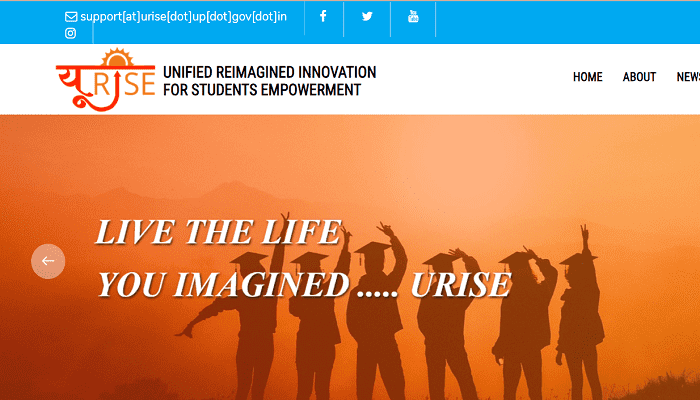
The official website of URISE portal is urise.up.gov.in. This portal has been launched for the empowerment of the students and for the students of the state government to find jobs. Engineering, polytechnic, vocational and skill training along with polytechnic, vocational and skill development courses have been added on this portal and in the second phase, a target has been set to connect all the engineering universities of the state.
UP URISE Portal – Brief Description
Name of Portal
URISE Portal
Category
Government Scheme
Beneficiary
All students of Uttar Pradesh
State
Uttar Pradesh
Launch date
24 September 2020
Objective
To provide various facilities to the students of the state
The main objective of launching this portal is to promote the field of education and create new employment opportunities. This portal has been issued by the state government for the betterment of the students, through this portal students can complete the course, syllabus and job information.
Benefits of URISE Portal
Below we have explained in detail about the benefits of URISE portal, by reading which you can know in detail about the benefits available on URISE portal.
Only the students of Uttar Pradesh will get the benefit of URISE portal.
Through this portal, students will also get employment related information.
Through this portal, students can read the available courses.
The facilities available from this portal will lead to development of education.
Students will also get career related facilities on URISE portal, in which e-library, internship, online examination, employment related information/video courses will be available.
Through the UP URISE portal, students can get information related to colleges and universities.
Students will get information about polytechnic, engineering, vocational and skill training through this single portal.
By login to this portal, students can also get information related to fees, syllabus, e-syllabus material.
Studies videos, lectures and question bank have also been made available on URISE Portal.
How to do URISE Portal Online Registration?
If you are a student and you want to do urise portal registration, then read all the steps given below carefully and follow-
To register yourself on URISE Portal, first of all visit the official website of URISE Portal https://urise.up.gov.in/.
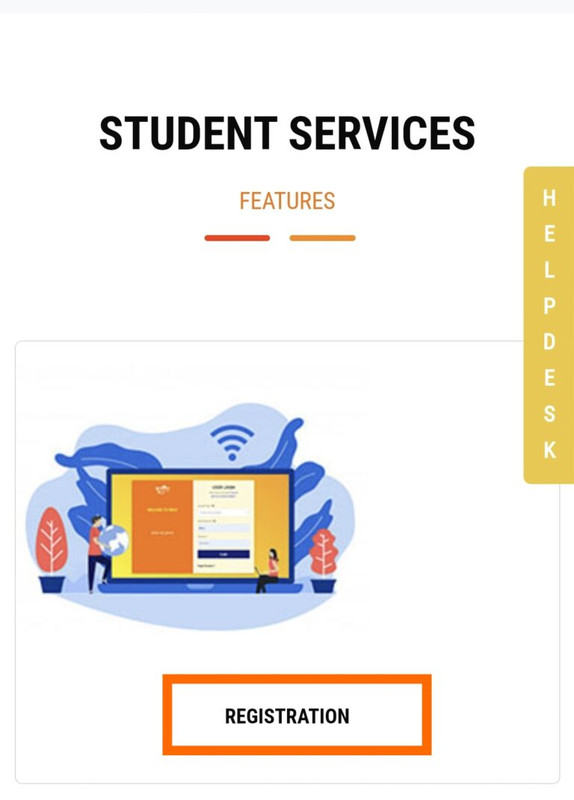
After opening the home page, go to the STUDENT SERVICES section, and click on the option of registration.
UP URISE Portal Registration
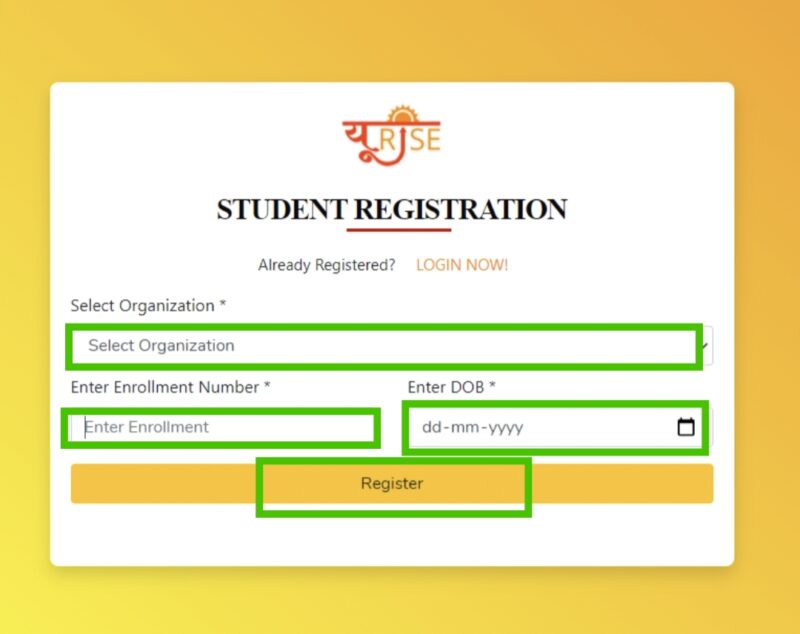
After that a new page will open, select the organization given on that page, after that enter the enrollment number, after that enter your date of birth and click on register.
UP URISE Portal Registration
After filling the requested information Organization, Roll Number, Date Of Birth, your URISE Portal Online Registration process will be completed as soon as you click on Register.
URISE Portal User Login
To login urise portal follow the following steps given below.
First of all visit the official website of Urise Portal.
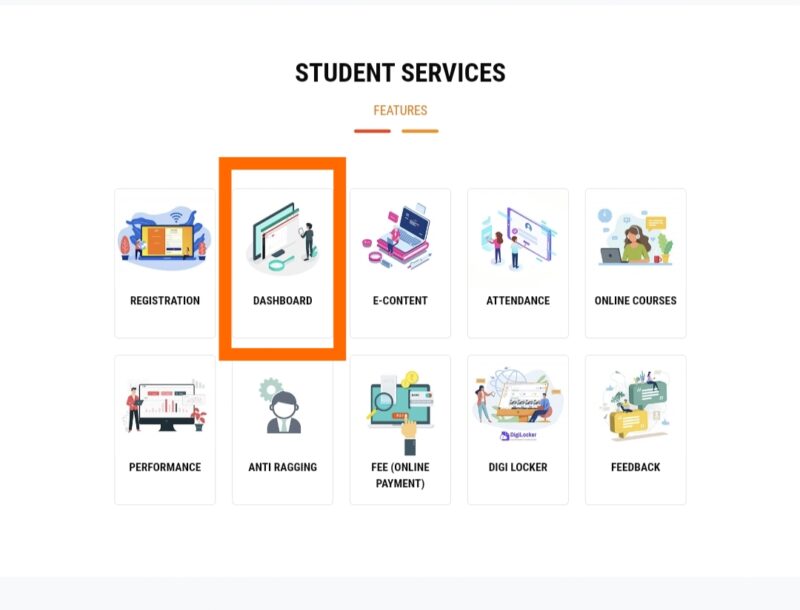
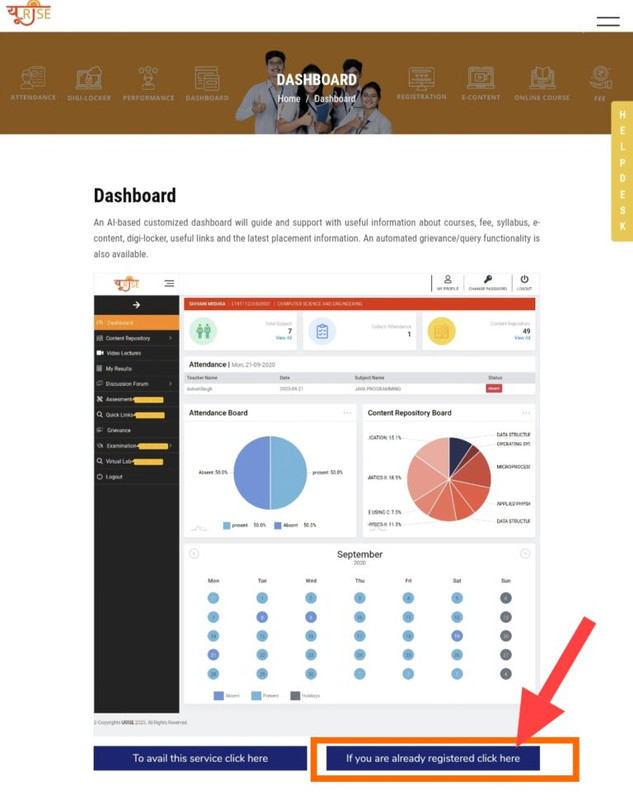
After that go to Student Services and click on the link for Dashboard.
UP URISE Portal
After that a new page will open, in which “If you are already registered click here” will be written, click on it.
UP URISE PortalLogin
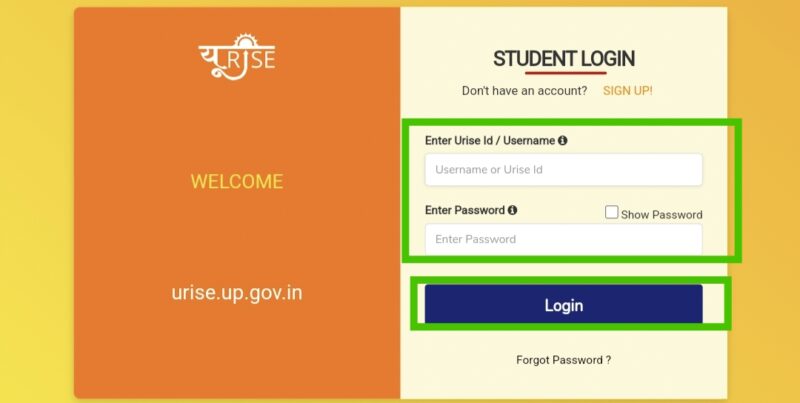
User Login Application Form will open in front of you as soon as you click.
UP URISE Portal Login
After that the login page will open in which you can login urise by entering your user id / username and password.
Process to View Syllabus on URISE Portal
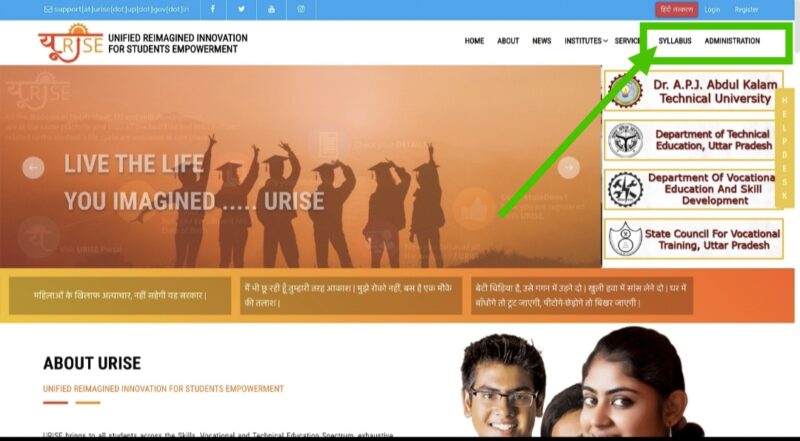
To see the syllabus on the URISE portal, first of all visit the official website of U RISE https://urise.up.gov.in/.
In the menu option, you will have Syllabus written, click on it.
UP URISE Portal
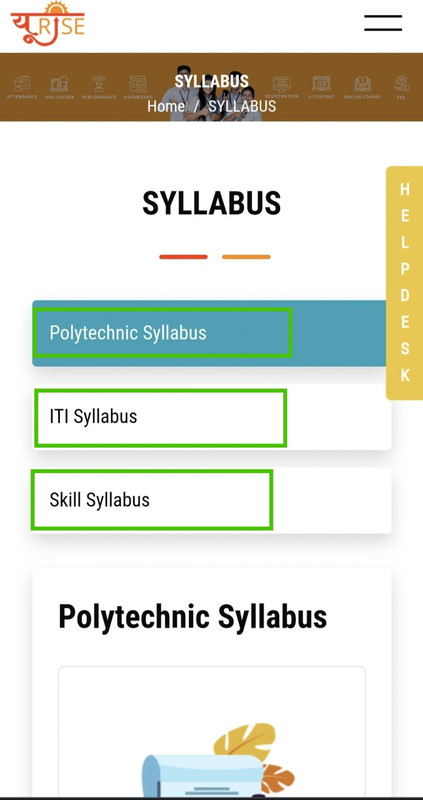
After which you will see the page given below, in which you can get the PDF of the ongoing course and recruitment immediately.
UP URISE Portal
To see the syllabus, click on the link of the syllabus, after which the syllabus will open on your screen, which you can read and see.
How to view URISE Portal Online Courses?
If you want to know about the courses available on the Urise portal, then you can see the online course by following the following procedure-
First of all you visit the official website.
After opening the home page, the option of Online Courses will be given in the section of the menu, click on it.
After this, all the lecture related videos available on the portal will appear on your screen.
On the page of the video, you get the option of search. From where you can search and watch lecture videos according to your needs.
What is URISE Portal Helpline Number?
You can use the helpline number given below for any complaint and assistance related to URISE portal.
If you are facing any kind of problem related to the portal, then you can solve your problem by contacting its helpline number – 8090491594 / 8604356415 / 0522 – 2336851 or email id uriseup2020@gmail.com.
The full form of URISE portal is Unified Reimagined Innovation For Students Empowerment, education related services are available on this portal.
When was the Urise portal launched?
URISE portal was launched in September 2020.
How to view courses on URISE portal?
For course information from URISE portal, you must first visit the official website, after opening the official site, you will get the option of online course, by clicking on it you can get information about online course.
What is URISE Portal Helpline Number?
The helpline number of URISE portal is 8090491594 and 8604356415 and 0522 – 2336851.
PayManager is a portal under the Rajasthan Scheme released by the Government of Rajasthan. Which is used to prepare salary bills, developed for Panchayati Raj employees of Rajasthan Government. This portal provides a common and integrated platform for preparing pay bills for these employees. Whose software not only provides the facility to prepare salary bills but also provides the facility to prepare DA arrears, bonus, arrears.
In such a situation, I will tell you in detail about Pay Manager as well as Pre Paymanager, Pri Paymanager, Paymanager 2 raj nic in, Paymanager Login. Using which you can easily get information about your salary sitting at home. So that your time will be saved, and you will be able to do some other work in the remaining time.
The main objective of launching this portal was to make all the information related to the salaries of government employees available online. After which they can easily get all the information just by visiting this portal. In this process, making all the work paperless was also a main objective of the government. That is, in simple words, PayManager Rajasthan portal has been started for information about salary and allowances.
What are The Benefits of Paymanager 2 raj nic in?
This portal (PayManager) has the following benefits –
Information about salary and allowances is easily available.
All this information can be obtained through online medium.
All these processes are paperless.
Earlier, it was not possible to get clear information about how much tax has been deducted and how much allowance has been received, but now you can get all this information easily.
All employees of Rajasthan state can avail the benefits of HOD Registration, Bank Registration, etc. on PayManager portal.
You can also print the salary slip.
All state employees can download and print the GA 55.
How to Login PayManager?
For this i.e. for paymanager2.raj.nic.in login you can use the following steps-
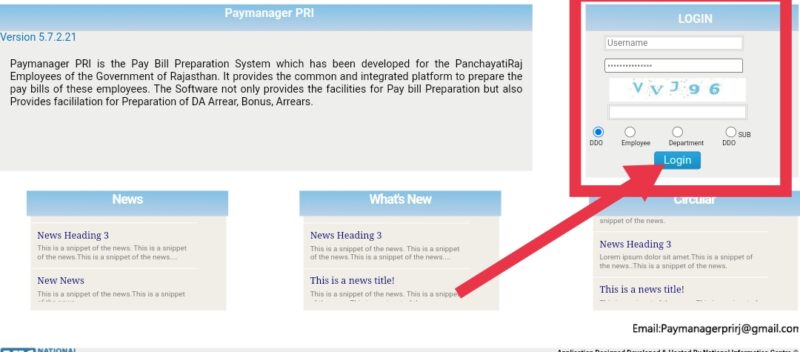
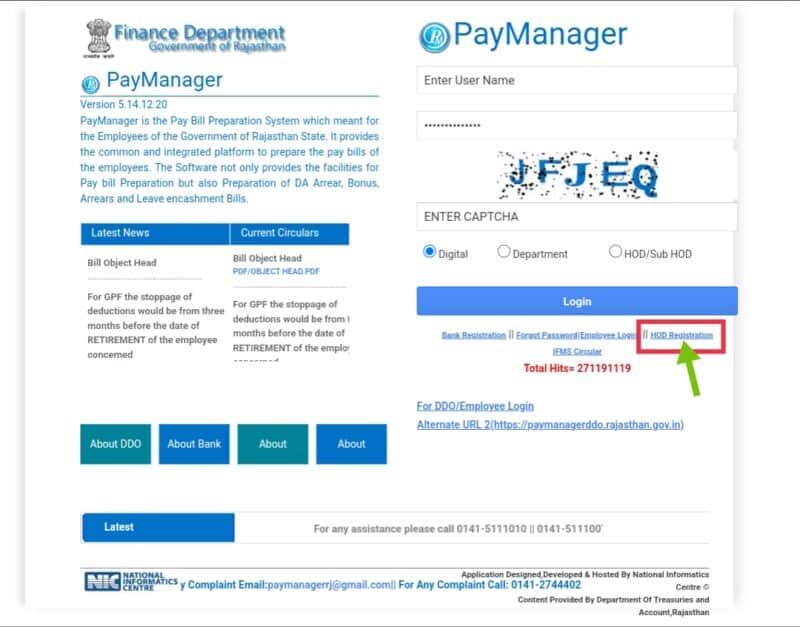
After this you will see four options in the login section on the right side-
DDO
Employee
Department
Sub DDO
Whichever form you want to login in, you can select it through radio button.
Then after that you enter the username and password.
Then enter the captcha given below and click on the “Login” button.
As soon as you click, you will be logged in.
PayManager Salary
How to do Paymanager Bank Registration?
If you want to do PayManager Bank Registration, then you can follow the following steps –
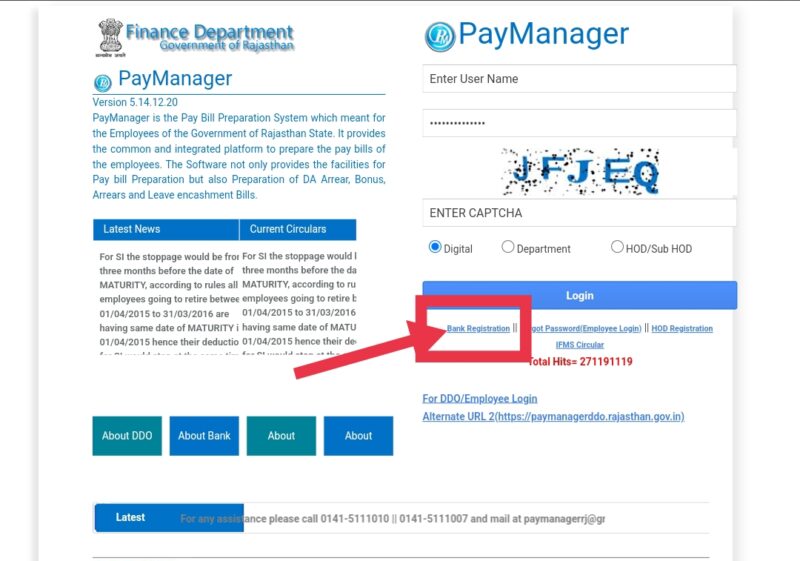
First of all you visit https://paymanager.rajasthan.gov.in/.
After this, if you look carefully below the login button, you will see an option of “Bank Registration”, click on it.
PayManager Salary
As soon as you click, a page will open in front of you, in which you will have to fill the following information-
Name
username
treasury or bank
treasury or bank code
sub treasury code
full address
E-mail
phone number
name of office
Password
re-password
By entering and clicking on “Verify Contact” you can register yourself with PayManager Bank.
PayManager Salary
How to Reset Paymanager2.raj.nic.in forgotten password?
If you want to reset paymanager raj nic password then you can follow the following steps –
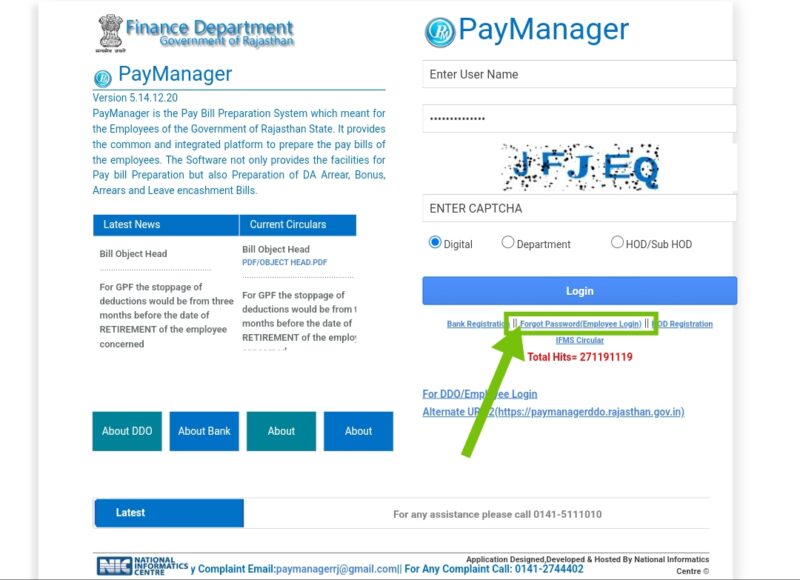
First of all you have to visit “https://paymanager.rajasthan.gov.in/”.
After that you have to click on the link “Forgot Password (Employee Login)” below the login button.
PayManager Salary
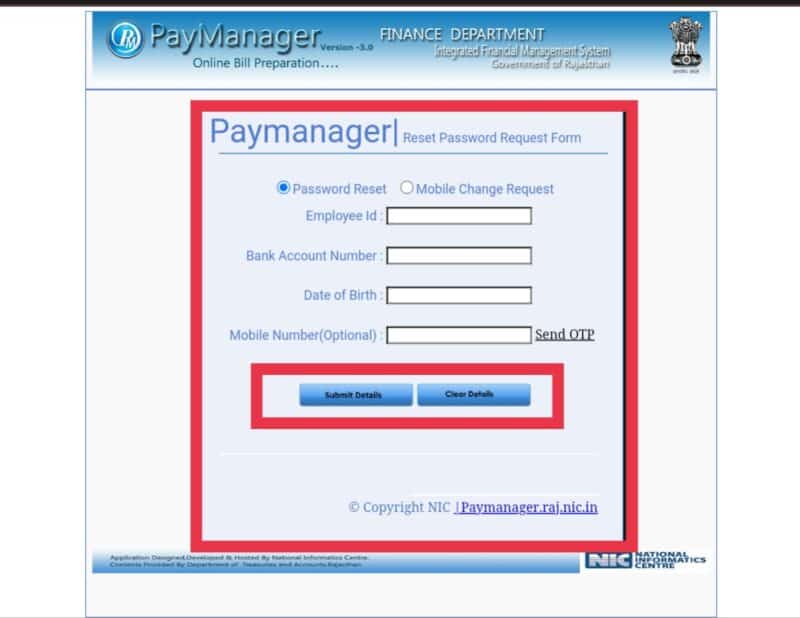
As soon as you click, a page will open in front of you, in which you will see two options, the first option will be “Password Reset” and the second option will be “Mobile Change Request”.
Where whatever you have to do, you will click on the radio button in front of it.
After that you will have to fill some options, which are as follows-
Employee Id
Bank Account Number
Date of Birth
Mobile Number(Optional)
After this, you can reset Paymanager2.raj.nic.in forgotten password by clicking on “Submit Details” button given below.
PayManager Salary
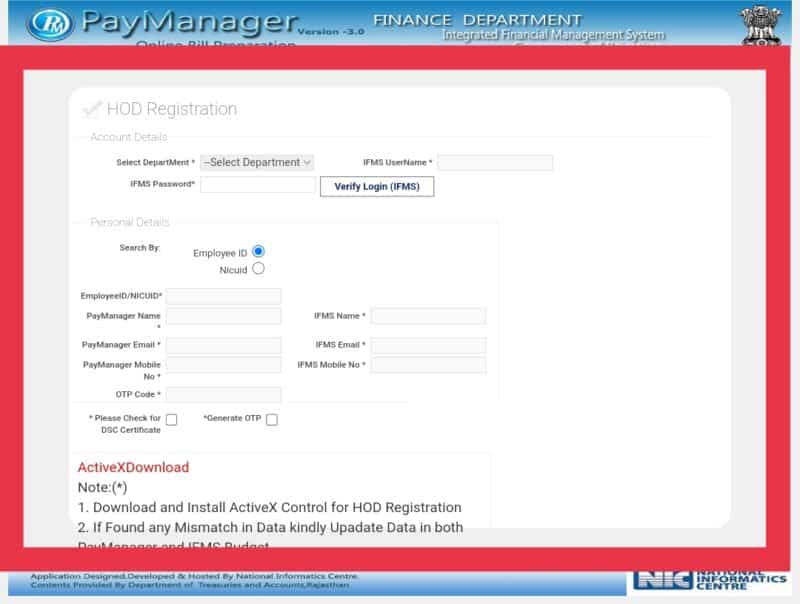
How to do HOD Registration?
For HOD Registration on paymanager2 portal, follow the following steps –
After that a page will open in front of you, in which you will have to click on the radio button with “Employee”.
Then enter your username, password and captcha above and click on the “Login” button.
As soon as you click, you will be logged in, after that you will have to click on “Employee Corner” from there.
After that, many options will be displayed in front of you in the form of a list, out of which you will have to click on the option “Employee Report” at the bottom.
Then some options will appear in front of you in the form of a mini list, click on the option “Payslip”.
After that, a small page will open in front of you, in which you will have to select the month, year etc. and click on the “Submit” option.
As soon as you click, your salary slip will appear in front of you, then you can easily download and print it.
You can download paymanager salary slip by doing all these processes.
This is one such portal released by the Rajasthan government. Through which government employees can get information about their salary and allowances through online medium.
Can one download the salary slip with the help of this portal?
Yes, with the help of this portal you can download your salary slip month wise.
Can this portal also be used by common citizens of Rajasthan state?
No, this portal cannot be used by common citizens of the state.
What is the name of its official website?
The name of its official website is https://paymanager.rajasthan.gov.in/.
How to Apply for Driving License online and offline? – As you might know how strict the government is regarding traffic these days. If you are a driver of a two or four wheeler on the road, then you would know the importance of a driving license. Apart from this, if you are caught without a driving license then a hefty fine is imposed on you.
Along with this, you can find out the name of the owner from the vehicle number, DL Status, e-Challan Status, online application for Driving License, Sarathi Parivahan Sewa (mParivahan), Check Driving License by Name & Address, RTO Information and driving license download, You can also get information about Driving License Renewal, Driving License Documents and Learning License.
If you want to get your driving license online sitting at home and also you want to know how to apply for driving license online sitting at home, then today we will give you complete information about it through this article on Sarathi Parivahan Portal. To apply for driving license online, it is necessary for you to have ID proof and some important documents, because you need these documents while applying for driving license online. After the driving license is made, you can download the soft copy of the driving license.
Documents Required for Online License Apply
Following documents are required to apply driving license online –
Permanent Address Proof: Election Card, Aadhaar Card, Passport, Tax Receipt of your house, Connection Receipt of Electricity Bill, Ration Card, Address Proof issued by Government Employees, Residence Certificate issued from Tehsil etc. There is one thing you must have.
Age Certificate: Your age is simply checked with this certificate whether you are 18 years old or not, in this you have to submit Birth Certificate, High School / 10th Marksheet or Sanad, PAN Card, Date of Birth Affidavit issued by Magistrate, etc. You must have one thing from.
Identity Card: In the identity card, you should have any one thing from Aadhaar card, election card, PAN card, passport, ration card etc.
If you have the above documents, then you can easily apply for driving license online.
types of driving license
If you are applying for driving license online then you should know how many types of driving licenses are made online. So that you can get your driving license online as per your requirement-
Learning License: Learning License is a license issued by the Regional Transport Office (RTO) which acts as a beginner driving license. To obtain a learner’s license, the driver must be aware of all the traffic rules and regulations and must pass a written test. The learning license holder can apply for a permanent license after 3 months or within 6 months.
Permanent License: A permanent license is issued after the validity of the learning license ends or after the applicant has learned driving.
Duplicate Driving License: Duplicate driving license is issued by the RTO in case the original driving license is lost/stolen.
Heavy Motor Vehicles: This license is issued to drivers of heavy motor vehicles/haulage vehicles.
International Driving License: International driving license is issued to those drivers who want to drive their personal vehicle in other countries also.
Light Motor Vehicle License: This type of vehicle falls in the LMV category. LMV license holder can drive light motor vehicles like car, jeep etc.
Age limit for driving license online application
Following is the age limit for driving license apply online-
For the candidate who has to apply online for driving license, the person should be a citizen of India and should be mentally sound.
The age of the applicant should be above 18 years.
16 years of age is valid for a 2 wheeler without gear, just the consent of the parents of the applicant should be there.
How To Apply For Driving License?
You can follow the following steps to apply for driving license online –
If you want to apply for driving license online, then first you have to go to the official website – https://parivahan.gov.in/parivahan/.
Here you have to click on “Drivers/Learners License”.
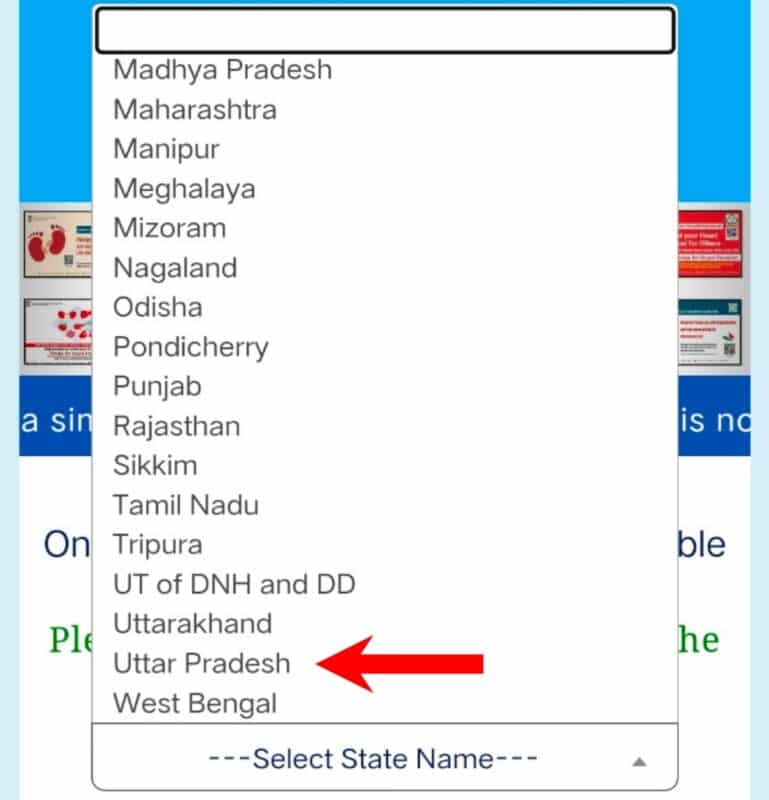
Now a new page will open in front of you in which you will have to select your state.
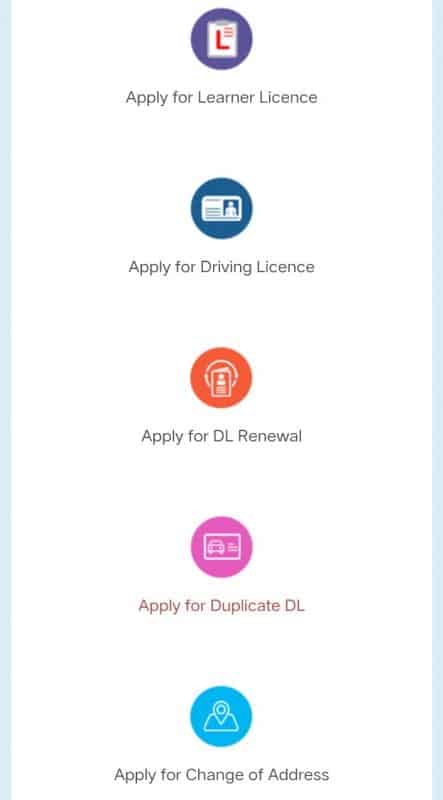
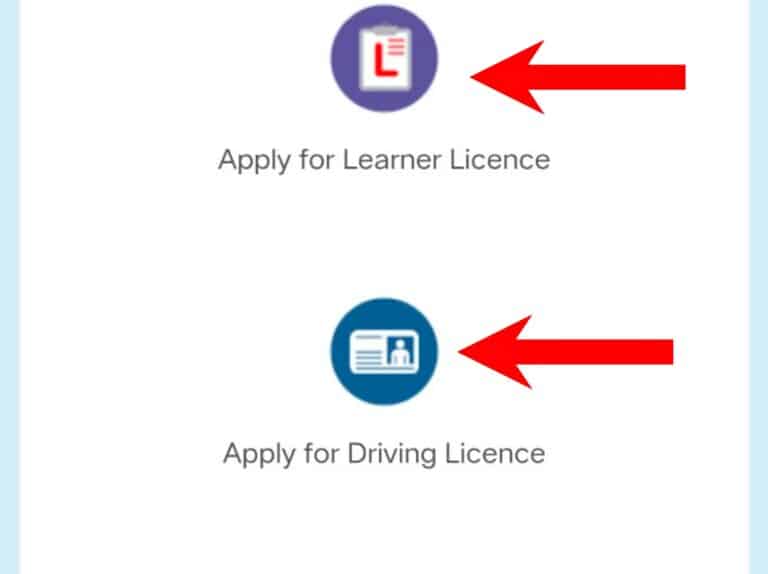
After selecting the state and submitting, a new page will open in which many options will be given, if you are applying for a learning license then you will have to click on “Apply for Learner License”.
How to Apply for Driving License
If you have got a learning license, then you have to click on the second option i.e. “Apply for Driving License”.
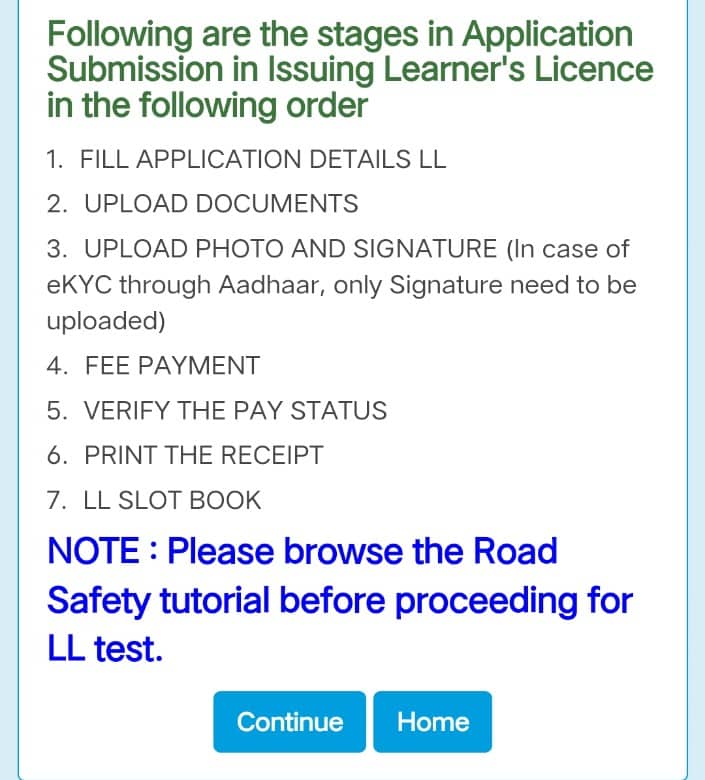
If you are applying for the first time then you will click on “Apply for Learner License”, after clicking a new page will open, in which it will be given how many steps will be taken to complete your driving license form.
After that click on “Continue”, after this a new page will open in which the date of birth of the applicant will be asked, fill it correctly and submit.
How to Apply for Driving License
After this, fill whatever information will be asked from you and submit your form and make the payment.
After this you can book your slot in the nearest RTO office and choose the date and time as per your choice.
You will have to appear at your chosen RTO office on the time and date chosen by you.
Hopefully, you would have liked this information given by us. Apart from this, if you want, you can also get the information about e-challan Status / e-challan check By vehicle number by clicking on the link. Because if you are caught driving without a driving license, then your challan can be deducted. Apart from this, if your driving license is lost, then you can also check driving license online.
UP Driving Licence Online Apply
Uttar Pradesh is the largest state of the country in terms of population. if you are a resident of Uttar Pradesh, and you want to apply for Sarathi Transport License Uttar Pradesh. So through this article, you will be able to know how to apply for driving license online. And what are the process and necessary documents for this.
Types of UP Driving License
Like other states, Uttar Pradesh also has different types of driving licenses that you can apply for. Depending on the type of vehicle you want to drive in UP, the RTO in your jurisdiction will issue a specific license. Following are the types of UP Driving License-
Learner’s License: Learner’s License is the license that is granted to any citizen when he is in his learning phase.
Permanent License: After the learning phase is over, the learning license holder becomes eligible for a permanent license.
Apart from this, driving licenses are issued for the following types of vehicles-
Motorcycle less than 50CC (MC50CC)
Gearless motorcycle (non-transport) MCWOG
Geared Motorcycle (Non-Transport) MCWG
Light Motor Vehicle (LMV)
LMV 3 Wheeler NT (3W-NT)
LMV Tractor NT (Tractor)
E-Rickshaw (E-Rickshaw)
Other various vehicle types: Road Roller/Crane/etc.
Documents required for Uttar Pradesh Driving License
The following documents need to be submitted when you are applying for a driving license in the state of Uttar Pradesh:-
Application through Form 2 (For Learner’s License)
Application through Form No. 4 (For Permanent License)
learner license
driving certificate
Medical Certificate through Form No. 1-A.
Passport size photograph – 3 copies.
age certificate
Address proof
Aadhar card
How to apply for UP Driving License offline?
To do DL Online UP, the applicant has to fill Form-4 and submit it along with other required documents to the RTO officer issuing Sarathi Transport License Uttar Pradesh. After this all the documents given by the applicant will be verified after which the driving test will be conducted.
After submitting the application for Driving License Online Apply In Up the following process will be conducted by the concerned authorities:-
For the Practical UP Driving License Test, the applicant has to first go to the ARTO office.
If the applicant qualifies the exam, the DL will be sent by post to the given address of the applicant after approval from the licensing authority.
If an applicant is failed, then after one week he/she can appear in the exam again.
Apart from this, the applicant will have to appear in a computerized test for Learner’s License.
How to Apply Driving License UP Online?
If you are a resident of Uttar Pradesh and you want to do up dl online, then you have to follow the simple steps given below-
How to Apply for Driving License
On the homepage, select the state from where the service is to be availed.
How to Apply for Driving License
Click on the “Apply Online” option.
A new web page will be displayed on your screen
Click on the “Continue” button.
How to Apply for Driving License
Driving License Online Apply Application Form will be displayed on your screen.
Fill all the required details like- personal details, address details, category of vehicles.
Now click on submit button.
Take a printout of this application form and keep it safe for future reference.
What is Driving License Online Fees?
Following are the fees for driving license Uttar Pradesh-
You can immediately download the Ayushman Card Download in PDF format when the card has been approved to benefit from a range of healthcare advantages. Visit pmjay.gov.in straight away to download the card if you have already completed the Ayushman Card registration process.
Through the login process on @pmjay.gov.in, those who have successfully applied for an Ayushman Bharat Card can access their dashboards.
For the Ayushman Card Login, you must provide your phone number or Aadhar Card number.
On the Dashboard, users can view the Application Status, a list of participating hospitals, a list of diseases that are covered, and other data.
You can find out more about your ABHA Card Number by logging into your Ayushman Card account.
Steps for Ayushmaan Card Download
You can immediately download the Ayushman Card Download in PDF format when the card has been approved to benefit from a range of healthcare advantages. Visit pmjay.gov.in straight away to download the card if you have already completed the Ayushman Card registration process.
Through the login process on @pmjay.gov.in, those who have successfully applied for an Ayushman Bharat Card can access their dashboards.
For the Ayushman Card Login, you must provide your phone number or Aadhar Card number.
On the Dashboard, users can view the Application Status, a list of participating hospitals, a list of diseases that are covered, and other data.
You can find out more about your ABHA Card Number by logging into your Ayushman Card account.
To apply for a ration card online, follow the steps given below:
Step 1: Visit the official website of your state’s food and civil supplies department.
Step 2: Look for the option to apply for a new ration card and click on it.
Step 3: You will be redirected to a new page where you will be required to fill out the application form.
Step 4: Provide all the necessary details such as your name, address, contact details, family members’ details, and other relevant information.
Step 5: Upload the necessary documents such as proof of identity, proof of address, and passport-sized photograph of the applicant and family members.
Step 6: Once you have filled out the form and uploaded the documents, submit the application.
Step 7: You will receive a reference number or application number, which can be used to track the status of your application.
Step 8: The concerned authorities will verify your application and documents.
Step 9: Once your application is approved, you will receive your ration card via post or you may be required to collect it from the concerned office.
Note: The application process may differ slightly based on the state’s policies and guidelines. It is recommended to read the instructions carefully before filling out the application form.
Ans: A Bihar Ration Card is an important government document that is issued to the eligible residents of Bihar. It serves as proof of identity and also entitles the cardholder to receive food grains and other essential commodities at subsidized rates from the Public Distribution System (PDS) under the National Food Security Act.
Q: Who is eligible to apply for a Bihar Ration Card?
Ans: All the residents of Bihar, who meet the eligibility criteria, can apply for a Bihar Ration Card. The eligibility criteria include the family’s income, family members’ details, and other factors as specified by the Bihar government.
Q: How can I apply for a Bihar Ration Card?
Ans: You can apply for a Bihar Ration Card through the official website of the Bihar State Food and Civil Supplies Corporation Limited. Alternatively, you can also visit your nearest circle office or public distribution system center to get the application form and submit it there.
Q: What are the documents required to apply for a Bihar Ration Card?
Ans: The documents required to apply for a Bihar Ration Card include proof of identity, proof of residence, proof of income, and a recent passport-size photograph. The specific documents required may vary depending on the type of ration card you are applying for.
Q: How can I check the status of my Bihar Ration Card application?
Ans: You can check the status of your Bihar Ration Card application online through the official website of the Bihar State Food and Civil Supplies Corporation Limited. You will need to enter your application number to check the status.
Q: How long does it take to get a Bihar Ration Card?
Ans: The time taken to issue a Bihar Ration Card may vary depending on the verification process and other factors. It can take anywhere from a few days to a few weeks to receive the ration card.
Q: Can I apply for a Bihar Ration Card if I already have a ration card from another state?
Ans: No, you cannot apply for a Bihar Ration Card if you already have a ration card from another state. The ration card is issued based on the state of residence, and having multiple ration cards is not permitted.
How to Download Bihar Bhu Naksha? – The state government of Bihar has made the facility of viewing the land map online in the state. Now the citizens of the state can see the online Naksha Bihar of their land by visiting the Bhu Naksha Bihar portal. Through this article, we are going to tell you about Bihar Bhu Naksha download. If you are from Bihar state and you want to know about your Bihar state land records then you can easily find out about your land records by reading this article.
Bihar Revenue Department has made the facility of schemes like Bhu Naksha Bihar Check and Bihar Bhoomi Naksha download online. By using this facility, any person can see and get the map of his farm, plot or land while sitting at home. Earlier, if someone wanted his Bhu Manchitra Bihar, then he had to visit the government office and after a lot of effort, we used to get the documents of Bhu Manchitra Bihar.
How to Download Bihar Bhu Naksha?
Department
Revenue and Land Reforms Department, Bihar
Portal Name
Bihar land map
Category
government scheme
Name of Article
How to Download Bihar Bhu Naksha?
Beneficiary
All the people of the state of Bihar
Location
Bihar state
Download Mode
Online
Official Website
bhunaksha.bihar.gov.in
Services available on Bihar Bhu Naksha Portal
Facility to check land map
Facility to edit land map
Facility to download land map
Facility to digitize land map
How to View Bihar Land Map on Bhunaksha.bihar.gov.in and Download Bihar land map?
If you want to see Online Bhu Naksha Bihar, then for that you have to go to the Bihar Bhu Naksha portal, you have to follow some steps to see the Bihar Bhu Naksha, which is given below. The process to view Bihar land records online is through the Bihar Bhu Naksha website.
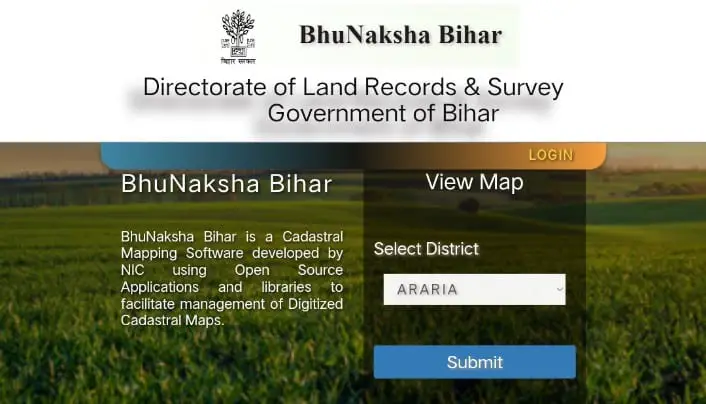
To see Bihar Bhu Naksha online and download Bihar Bhu Naksha, first of all visit the official website of Bihar Bhu Naksha (Bhu Naksha Bihar) i.e. bhunaksha.bihar.gov.in/bhunaksha/.
How to Download Bihar Bhu Naksha?
After the home page opens, on the left side, you will have to fill important information like district, subdivision, mandal, mouza, type and sheet.
After filling the above details you will see the following map on the screen.
How to Download Bihar Bhu Naksha?
If you want to know about a particular plot like plot number, plot owner name, address, plot area, land classification, etc., it will appear on the screen.
If you want to download the verified plot report in PDF format, click on the ‘LPM’ report tab on the left. A PDF report of the concerned land will open in a new window.
In this way you can download and view BiharBhu Naksha Bhu Naksha Bihar Pdf Download.
How to get Bhunaksha Bihar home?
Disputes continue in the country and states regarding the land map and land. In such a situation, Alok Mehta, Minister of Land Reforms, Government of Bihar, has started a new land-related service for the citizens of Bihar, which will give more benefits to the people of Bihar. In fact, Bihar is the first state in the country which has taken such initiative for its citizens, so that the people of Bihar will get Bhunaksha Bihar sitting at home, whose process is as follows-
First of all you have to go to the official website of dlrs bihar.
There you will find the icon of door step delivery on the home page itself. Have to click on it.
After that a new page will open, in which you will first get the search map here form. In that, fill the information of any place you want the map of, after that search it.
After that you have to Add Cart that map.
After that you have to make the payment online only.
After that the map will be delivered to your address via speed post.
Documents required to get Bihar land map sitting at home
When you order Online Bhu Naksha Bihar, get it at home, then you will have to pay ₹ 50 online, only then it will be delivered online at your home.
residence certificate of the applicant
Applicant must have Debit Card or Credit Card
Aadhaar Card of the applicant
What are the benefits of Bhu Naksha Bihar?
The map provided by bhu map bihar determines the exact boundary of the plot. Before buying any land, buyers can verify the total area, dimensions and shape of the land online through bhulekh map bihar. The Bhu Naksha Bihar portal helps buyers verify the validity of land records online.
The citizen of Bihar does not need to go anywhere to see the Bhu Naksha of his own land. Citizen of Bihar can see Village Bhu Naksha Bihar while sitting at home.
You can see Village Bhu Naksha Bihar with the help of your phone and laptop and can also print it.
With the introduction of online Bhu Naksha service, the citizens of Bihar will save both time and money.
With the introduction of this scheme, people will not have to go round any tehsil.
Applicants can see the land in Naksha Bihar and download Bihar Bhu Naksha with the help of their account number or land number.
Registering the land will save the applicant’s time.
How to download Bhulekh through Bihar Bhoomi website?
The ROR (Record of Rights) report and plot maps of the land can be obtained through another process. Follow the step-by-step procedure below to download Bhu Naksha Bihar online from the website of the Revenue Department.
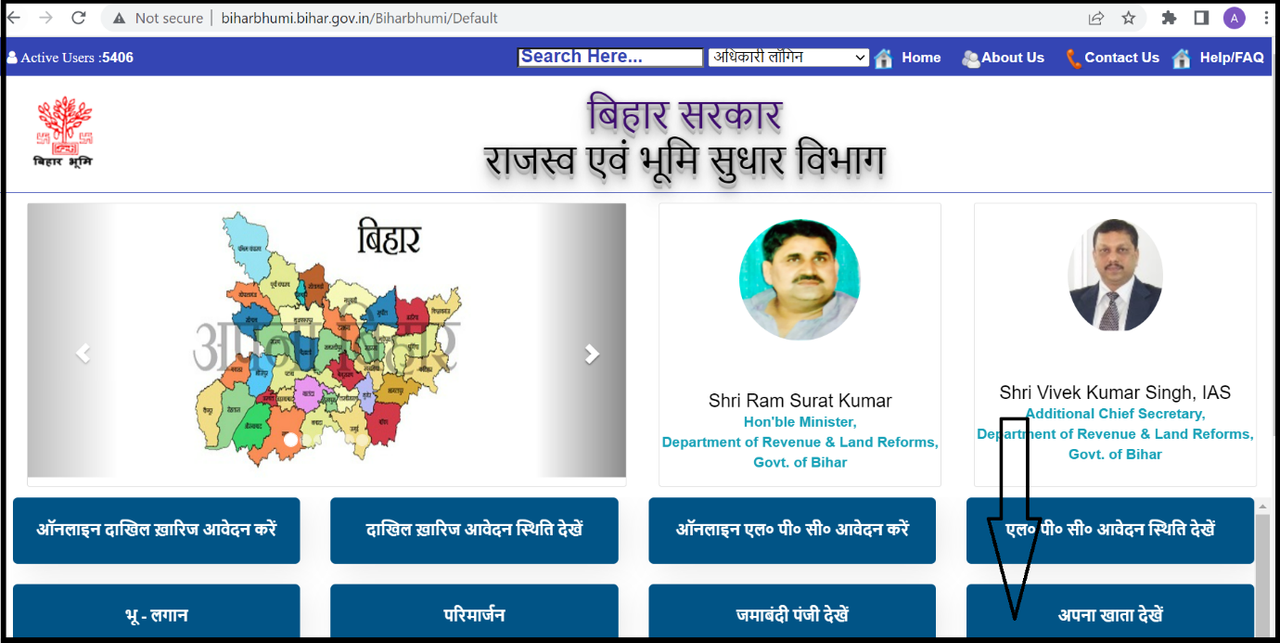
Step 1: Visit the official website of Department of Revenue and Land Reforms, Government of Bihar.
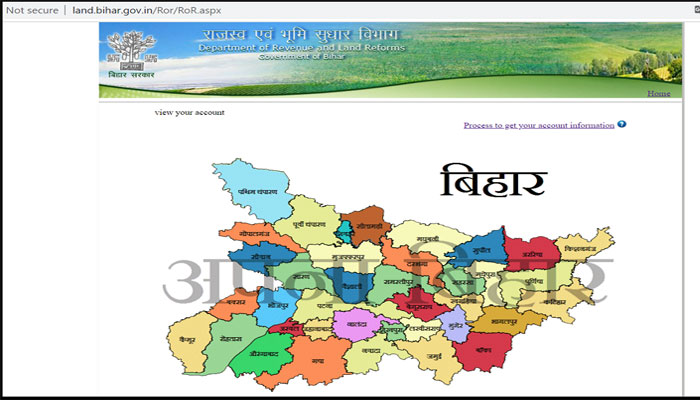
Step 2: On the homepage, click on the ‘View Your Account’ tab.
How to Download Bihar Bhu Naksha?
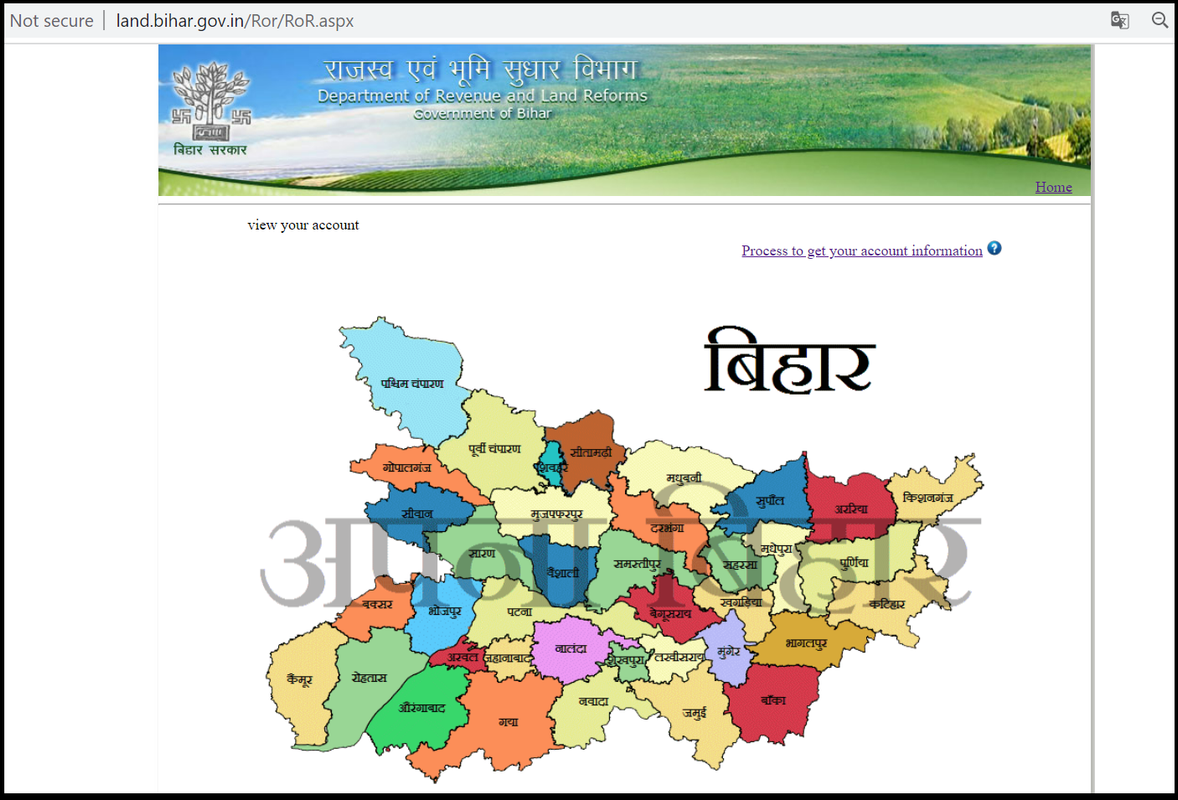
Step 3: A new window will open. Here, select the concerned district of Bihar.
How to Download Bihar Bhu Naksha?
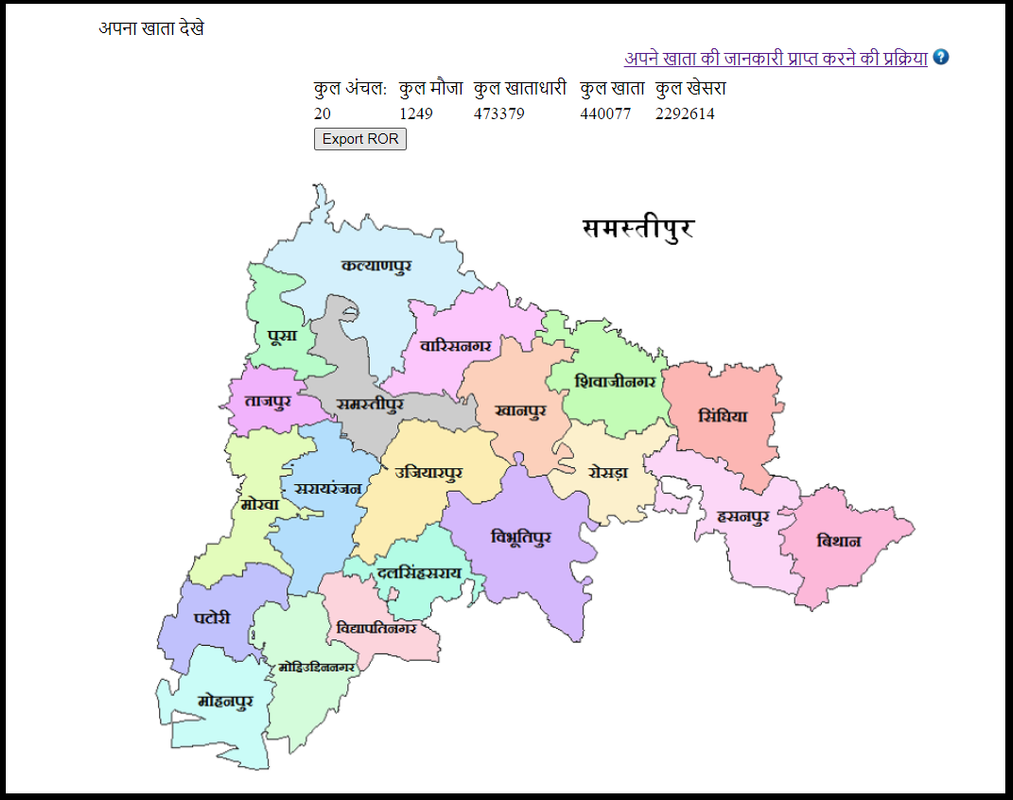
Step 4: When you will select the district, the following window will open.
How to Download Bihar Bhu Naksha?
Step 5: Click on the desired tehsil of the district.
How to Download Bihar Bhu Naksha?
Step 6: Fill the details like Subdivision, Circle, Account Number / Khasra Number, Account Number and click on Search Account button. Details will appear online.
How to find Bhu Naksha in Bihar by plot number?
Bhu Naksha Bihar (Bhu Naksha Bihar) facilitates the user to search the map or Bhu Naksha using the plot number. To find Bhu Naksha using plot number, follow the following steps.
Step 1: Visit the official website of Bhu Naksha Bihar @https://bhunaksha.bihar.gov.in/.
Step 2: On the left side of the home page, you need to fill the information like district, subdivision, Mandal, mouza, type and sheet.
Step 3: After filling the above details, a map of the selected area will appear on the screen.
Step 4: There will be a search bar at the top of the screen. You can search by entering the plot number and click on the search option.
Step 5: As soon as you click on the search button, the map of the required plot will be displayed on the screen.
Hope you have liked this information given about BhuNaksha Bihar and Bihar map download, visit the official website of Bihar Ka Naksha for more information related to it.
Some important questions related to Bihar Bhulekh map
What is Bihar Bhulekh Map?
If you understand the literal meaning of Bhu Naksha, then Bhu means land and Naksha means map. That is, any land that is very large, is displayed in a small form on the map.
Can bihar bhu naksha download as PDF?
Yes, Bihar Bhoomi Naksha can be downloaded as PDF through the official website.
Can Village Bhu Naksha Bihar be downloaded through this website.
Yes, through this Village Bhu Naksha Bihar can be downloaded.
What is the name of the official website of Bihar Naksha?
Its official website name is https://bhunaksha.bihar.gov.in/.
How to Check Challan by Vehicle Number? – The rules regarding the means of transport have been made very strict by the Government of India. Let us tell you that the Government of India is now challaning two wheelers and four wheelers through online, so that the driver is not even able to know and these challans are mainly in the form of violating traffic rules, not wearing helmets. On wearing, in the absence of DL and when the RC of the vehicle is over, photographs are being clicked from the cameras and mobiles installed on the roads.
To check e challan details candidate must have vehicle number or holder number or DL number. In such a situation, today through this article we are going to check online challan as well as candidates, Driving License download, find out the name of the owner from the vehicle number, DL Status, e-Challan Status, online application for Driving License , Sarathi Parivahan Sewa (mParivahan), Check Driving License by Name & Address, RTO Information and Driving License Download, Driving License Renewal, Driving License Documents and Learning License can also be obtained by clicking on the relevant links.
If the candidate wants to check his vehicle challan. So he/she has to follow the following steps which the candidate can easily find out by following step by step –
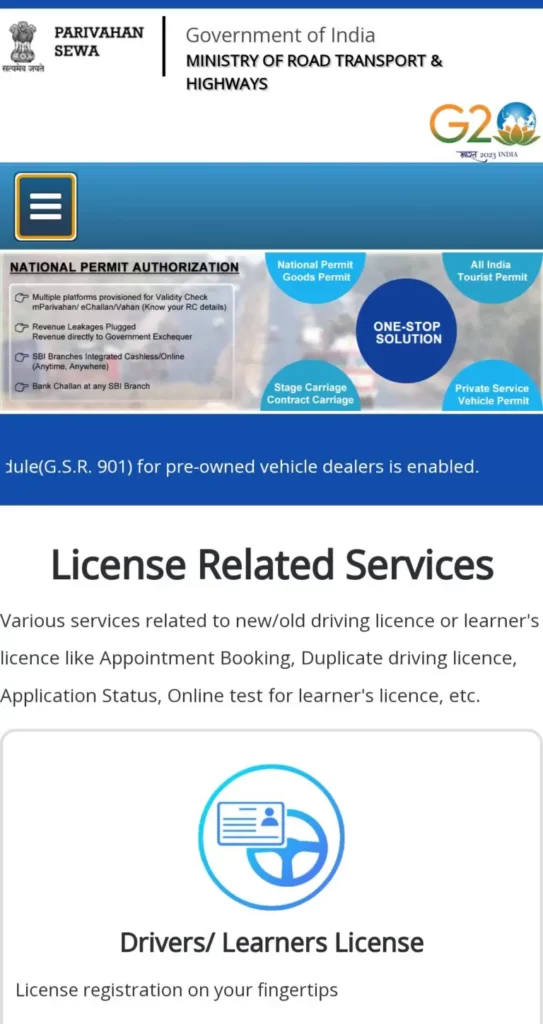
For e-challan check by vehicle number, first of all the candidate has to visit the official website of vehicle transport at parivahan.gov.in.
How to Check Challan by Vehicle Number
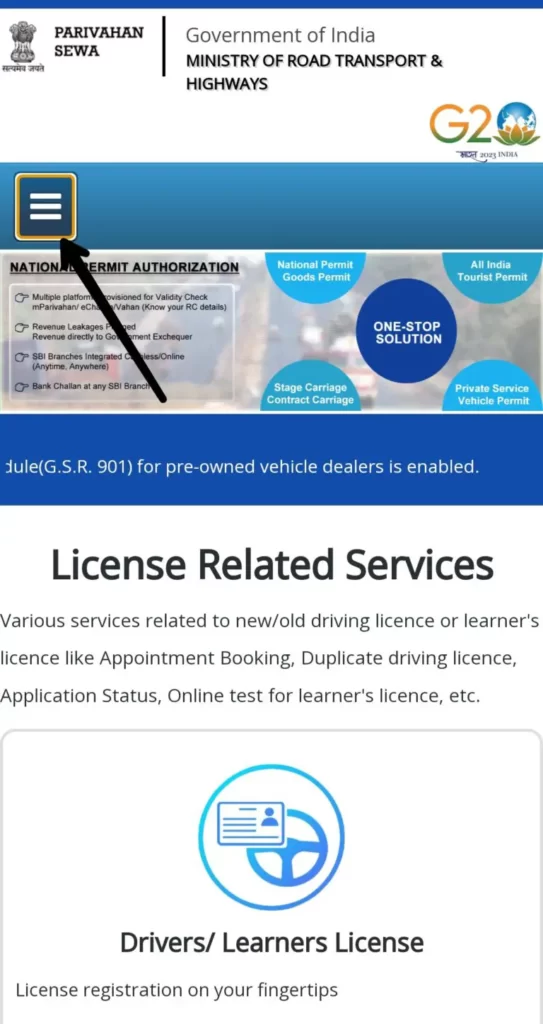
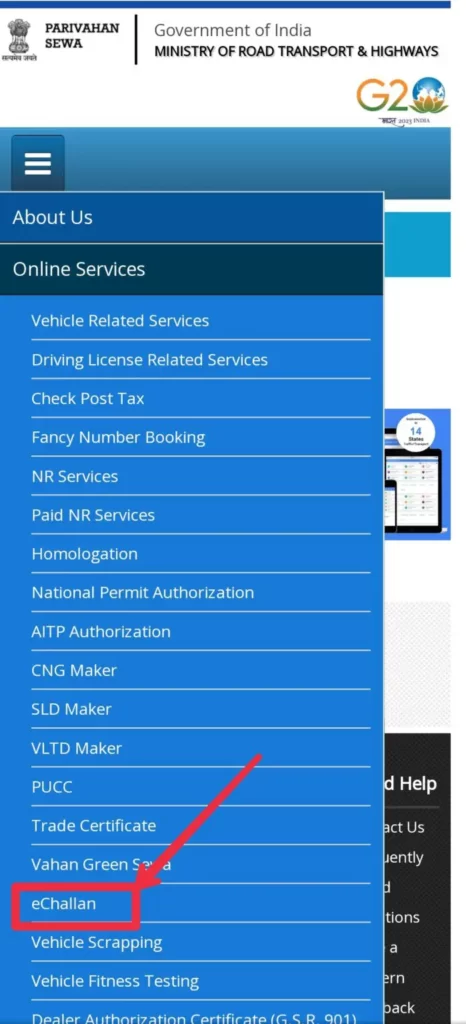
Then click on the menu bar given on the left side.
How to Check Challan by Vehicle Number
Now many options will open in front of the candidate. In which the candidate has to click on the option of e-challan.
How to Check Challan by Vehicle Number
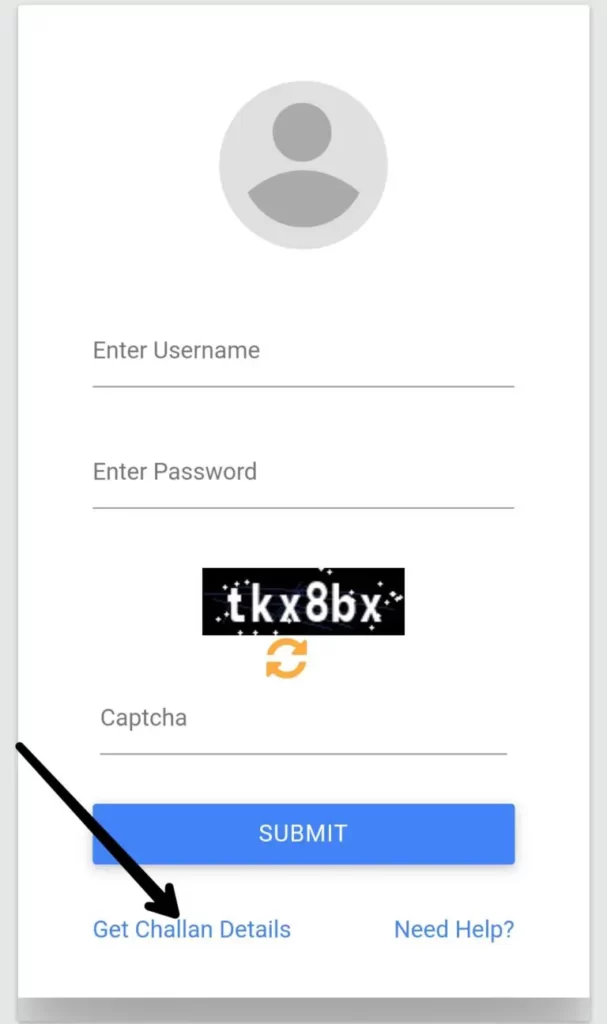
After clicking on E-Challan, a new page will open in front of the candidate.
Out of which you will have to click on the option “Get Challan Details” given at the bottom left.
How to Check Challan by Vehicle Number
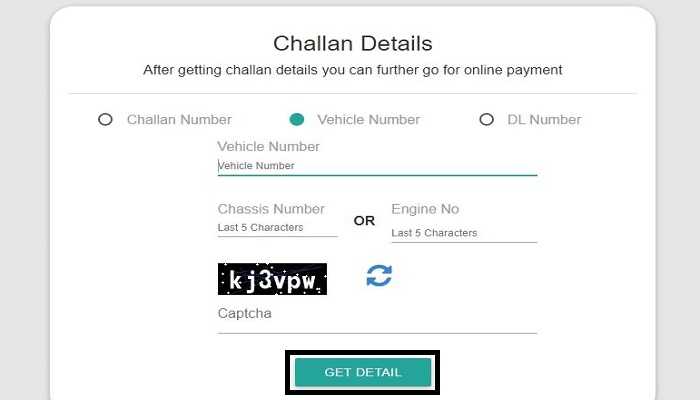
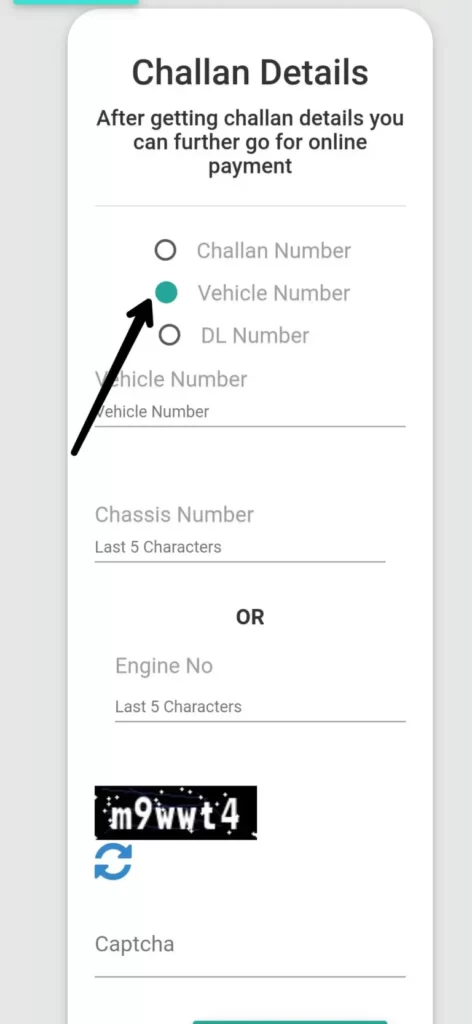
Again a new page will open in front of the candidate in which three options – challan number, DL number, vehicle number will be given.
The candidate has to click on the option containing the vehicle number.
How to Check Challan by Vehicle Number
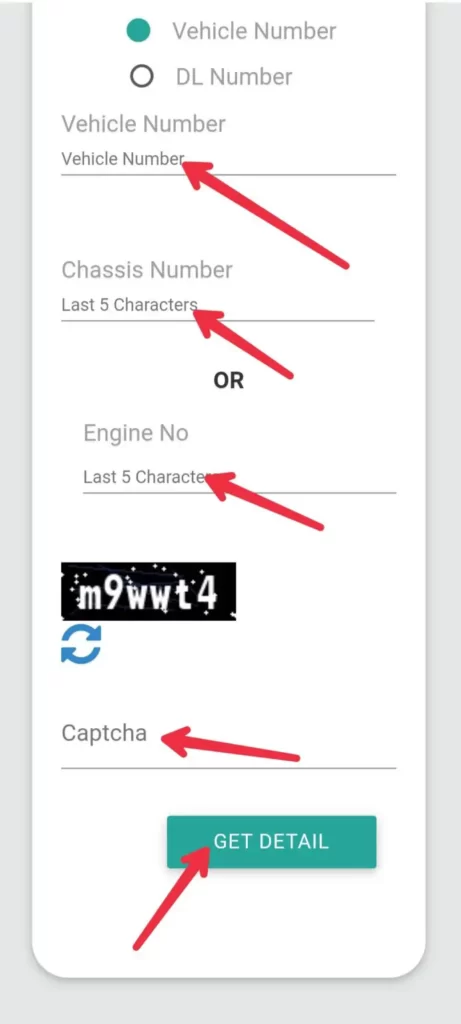
Now a new page will open in front of the candidate in which vehicle number and twenty four number or engine number (valid up to 5 digits) will have to be filled.
At the end, along with all the information, fill the given captcha code and click on the option of Get details.
How to Check Challan by Vehicle Number
Now complete information related to bike challan online check will appear in front of you. Which you can easily see.
We hope you have liked the information on Challan Check By Vehicle Number given by us. If you have any questions related to bike challan check, then you must ask by commenting below, we will try our best to answer your question
Bihar Diesel Anudan Yojana 2023 – A very good news has come for all the farmers of Bihar. Accordingly, online applications have been started for benefits under Bihar Diesel Grant Scheme. Such farmers who want to take benefits under this scheme should apply for it as soon as possible. Farmers will have to apply for benefits under this scheme through online. So if you also want to take advantage of this scheme, then you must read the information given below.
How to apply for benefits under Bihar Diesel Anudan Yojana 2023, when and how long you can apply for it. Complete information about which documents will be required to apply for benefits under this scheme is given in detail below. Click on the link given below to apply for benefits under this scheme and for more information about it.
Online applications have been started for benefits under the Bihar Diesel Grant Scheme. Such farmers who want to take benefits under this scheme should apply for it as soon as possible. Farmers will have to apply for benefits under this scheme through online. So if you also want to take advantage of this scheme, then you must read the information given below.
Bihar Diesel Anudan Yojana 2023
Under the Bihar Diesel Grant Scheme, grants are provided by the government to the farmers of the state to plant them with diesel powered pumpsets. Under this scheme, this time online applications have been started for Kharif season crop. You will not need to go anywhere to apply for the benefits under this scheme. You can apply online for this yourself. You can use the link given below to apply for the benefits under this scheme.
Benefits available under Bihar Diesel Anudan Yojana 2023
Diesel subsidy will be given at the rate of Rs. 75 per liter on diesel purchased for irrigating Kharif crops with diesel pumpsets, Rs. 750 per acre, per irrigation diesel.
Rs 1500 per acre will be payable for a maximum of 2 irrigations of paddy straw and jute crop.
Rs 2250 per acre will be payable for a maximum of 3 irrigations of pulses, oilseeds, seasonal vegetables, medicinal and aromatic plants under paddy, maize and other kharif crops in hard crops.
This grant will be given for irrigation of maximum 8 acres per farmer.
This grant will be payable to all types of farmers.
Apart from the farmers of the panchayat area, the amount of grant will also be payable to the farmers of the municipal area.
The benefit of this scheme will be given only to the farmers registered online in the DBT portal of the Agriculture Department.
The benefit of diesel subsidy will be given to only one member of the family. Husband-wife and their son/daughter who live together, considering them as a family, their applications will be accepted.
In the event of family division and separate family, separate applications can be accepted, provided the application is not made for the same land.
Subsidy will be payable only on diesel purchased for irrigation from the prescribed petrol pump within the state of Bihar.
Eligibility to avail benefits under Bihar Diesel Anudan Yojana
Farmers who do farming on other’s land (Non-Rayat), will be identified by the concerned Ward Member and Agriculture Coordinator to certify / verify them.
While verifying, it will be kept in mind that only the Jotedar who is doing actual farming gets the benefit of the grant.
Only such farmers should apply under this scheme, who are actually doing irrigation using diesel.
Diesel purchased and actually used for irrigation will be checked by the concerned Agriculture Coordinator.
Digital acknowledgment receipt (digital voucher) after purchase of diesel from authorized petrol pump, in which 13
The last ten digits of the registration number of the digit will be valid.
The benefit of this scheme will be given to online registered farmers only.
Important documents
To apply for benefits under this scheme, you will need some important documents. Complete information about what documents you will need to apply for benefits under this scheme is given in detail below.
farmer registration number
Photo
residence certificate
mobile number
diesel seller’s receipt
bank account passbook
Diesel receipt computerized / digital, last 10 digit of registration number on the receipt, receipt without farmer’s signature / thumb impression on the receipt will not be valid. The receipt will be valid only from 22-07-2023 to 30-10-2023.
Bihar Diesel Anudan Yojana 2023 how to apply online
To apply for this, you must first go to its official website.
You will find its link below.
Bihar Diesel Anudan Yojana
After going there you will get the section of Diesel Grant Kharif (23-24).
Where you have to click on the option of “Apply”.
After this a new page will open in front of you.
Bihar Diesel Anudan Yojana
Where you have to fill the information like grant type, register registration.
After this you have to click on Search.
After this, its application form will open in front of you.
Which you have to fill and submit correctly.
Download Bihar Diesel Anudan Yojana 2023 like this form
All those farmers who are sharecroppers and self + sharecroppers will have to fill and submit an application form to apply for benefits under this scheme.
To download this application form, you must first go to its official website. After going there you will get the section of Diesel Grant Kharif (23-24).
Where you have to click on the option of “Apply”. After this a new page will open in front of you. Where you will get the section of guidelines for diesel subsidy.
Where you will get the link to download this form in number 5/6. You can download this form as per your requirement.
Bhulekh UP |UP Bhulekh | UP Bhulekh 2023 | upbhulekh.gov.in
BhulekhUP : उत्तर प्रदेश सरकार की राजस्व परिषद ने भूमि अभिलेखों के लिए डिजिटल पोर्टल यानी भूलेख यूपी लॉन्च किया है। राष्ट्रीय भूमि अभिलेख आधुनिकीकरण कार्यक्रम के तहत भारत सरकार ने सभी भूमि रिकॉर्ड को डिजिटल कर दिया है। उत्तर प्रदेश भूलेख हिंदी के दो शब्दों भू + लेख से मिलकर बना है जहाँ भू का अर्थ भूमि और लेख का अर्थ विवरण या लेखा होता है। यूपी भूलेख का मतलब है जमीन का हिसाब/रिकॉर्ड रखना।
Bhulekh UP की मदद से कोई भी व्यक्ति अपनी या किसी और की भूमि के बारे मेंं जानकारी प्राप्त कर सकता है। UP Bhulekh की मदद से, राज्य के लोग अपने खसरा नंबर, खतौनी अपने भूमि का नक्शा और नंबर आसानी से प्राप्त कर सकते हैं। ऐसे में आज हम आपको इस लेख के जरिए यूपी भूलेख योजना वेबपेज – upbhulekh gov in पर मौजूद सभी सेवाओं की जानकारी प्रदान करें
UP Bhulekh का संक्षिप्त विवरण
WWW.SARKARIPORTAL.ONLINE
पोर्टल का नाम
Uttar Pradesh Bhulekh (उत्तर प्रदेश भू लेख) / Bhulekh UP land records
विभाग का नाम
भूमि अभिलेख अनुरक्षण विभाग
लॉन्च किया गया
उत्तर प्रदेश सरकार द्वारा
लाभार्थी
राज्य के सभी नागरिक
उद्देश्य
ऑनलाइन भूमि रिकॉर्ड या Land records UP प्रदान करने के लिए
Bhulekh UP (भूलेख वेब) पोर्टल का निर्माण उत्तर प्रदेश के भूमि रिकार्ड को कंप्यूटरीकृत करने के लिए इस प्रकार किया गया है। इसकी मदद से भू-अभिलेखों के प्रतिदिन की गतिविधियों को सुव्यवस्थित किया जाता है। Bhulekh Uttar Pradesh की मदद से राज्य के नागरिक अपना खाता नंबर, खसरा और खतौनी आदि देख सकते हैं।
भूलेख यूपी की मदद से हर उत्तर प्रदेश का नागरिक अपने घरों से अपने जमीन के रिकॉर्ड की जानकारी आसानी से जांच सकता है। इसके लिए नागरिकों अब अब राजस्व कार्यालय, यूपी लेखपाल या किसी अन्य संबंधित कार्यालय पर नहीं जाना होगा।
UP Bhulekh पोर्टल पर उपलब्ध अभिलेख क्या हैं?
यूपी भूमि रिकॉर्ड डेटाबेस – Upbhulekh में भूमि के स्वामित्व विवरण के साथ खसरा और खाता संख्या के अनुसार सभी पंजीकृत भूमि जोत का विवरण दर्ज है, जो निम्नलिखित है-
खसरा संख्या और खाता संख्या का विवरण
खातेधारक का नाम
खातेधारकों की संख्या
भूमि का आकार
संपत्ति के बदले किए गए लेन-देन का इतिहास, जिसमें बंधक, तीसरे पक्ष के दावे आदि शामिल हैं।
खाली संपत्ति आदि।
संबंधित लेख
भूलेख दिल्ली
अपना खाता राजस्थान
भूलेख झारखंड
यूपी भूलेख Khasra & Khatoni नक्शा कैसे देखें?
upbhulekh पोर्टल पर खसरा खतौनी यूपी विवरण की जांच करने के लिए इन चरणों का पालन करें-
सबसे पहले यूपी भूलेख पोर्टल – bhulekh up nic in up पर विजिट करें।
अब होमपेज भूलेख खतौनी / खतौनी (अधिकार अभिलेख) की नकल देखें पर क्लिक करें।
अब आपको स्क्रीन पर दिखाई देने वाले कैप्चा को सबमिट करें।
अब आपको भूमि रिकॉर्ड की जांच के लिए जिला, तहसील और गांव का चयन करने के लिए कहा जाएगा।
भूलेख खतौनी / ग्राम का नाम / ग्राम कोड चुने
अब आप खसरा/गाटा नंबर या खाता नंबर या मालिक (खातेदार) का नाम दर्ज करके अपनी खोज को आगे बढ़ा सकते हैं।
Bhulekh UP Khasra Khatauni
इस खाता संख्या के विवरण की जांच करने के लिए, संख्या का चयन करें और विकल्प ‘उद्धरण देखें‘ (खाता विवरण देखें) पर क्लिक करें।
UP Bhulekh Khasra Khatoni Verification
इस तरह से आप upbhulekh पोर्टल पर भूलेख खसरा / तहसील भूलेख खतौनी नकल खतौनी देख सकते हैं।
UP Land Record Check कैसे करें?
UP Bhulekh पोर्टल पर UP Land Record Check करने के लिए आपको निम्नलिखित चरणों का पालन करना होगा-
सबसेपहले upbhulekh.gov.in वेब पोर्टल को ओपन करें।
अब जनपद, तहसील और ग्राम का नाम चुनें।
अब खातेदार के नाम के द्वारा खोजें विकल्प पर क्लिक करें।
जमीन मालिक का नाम टाइप करें।
इसके बाद उस व्यक्ति के नाम पर कितनी जमीन है देखें।
इस तरह से आप UP Bhulekh पोर्टल पर जमीन का रिकॉर्ड ऑनलाइन देख सकते हैं।
यूपी सरकार द्वारा भी वर्ष 2016 में सभी भूलेख , खाता-खतौनी सम्बन्धी जानकारियां भी ऑनलाइन कर दी गई थी, जिसका उद्देश्य भूमि रिकॉर्ड आदि की जानकारियों को आम जन को आसानी से मुहैया कराना है।
bhulekh उत्तर प्रदेश पोर्टल से क्या लाभ है?
भूलेख पोर्टल के माध्यम से अब उत्तर प्रदेश के नागरिकों के लिए अपनी ज़मीन की जानकारी लेना काफी आसान हो गया है। इसके लिए उन्हें तहसील यह किसी लेखपाल के चक्कर नहीं काटने पड़ते हैं।
उत्तर प्रदेश भूलेख की आधिकारिक वेबसाइट क्या है?
उत्तर प्रदेश भूलेख की अधिकारिक वेबसाइट upbhulekh.gov.in है।
आशा है आपको हमारे द्वारा दी गई Bhulekh UP, UP bhulekh.gov.in से जुड़ी यह जानकारी पसंद आई होगी। ज्यादा जानकारियों के लिए आधिकारिक वेबसाइट पर जरूर विजिट करें।
भूलेख – BhuLekh, भूलेख,राजस्व ग्राम खतौनी का कोड जाने – BhuLekh,खतौनी की नक़ल प्रमाणित करे – BhuLekh,Bhu-Naksha (Indian Cadastral Mapping Solution),Bhulekh UP 2022-23: घर बैठे-बैठे जानें ज़मीन की हर जानकारी ,Bhulekh UP : यूपी भूलेख (upbhulekh.gov.in) खसरा/खतौनी कैसे,ऑनलाइन खसरा खतौनी कैसे चेक करें?@upbhulekh.gov.in | यू पी,UP भूलेख: 2023 में कैसे चेक करें खसरा-खतौनी और भू-नक्शा?,भूलेख खतौनी,भूलेख खतौनी उत्तर प्रदेशतहसील चुने up,तहसील भूलेख खतौनी नकल,ग्राम का नाम / ग्राम कोड चुने,भूलेख लखनऊ, उत्तर प्रदेशभूलेख खतौनी उत्तर प्रदेश barabanki,खसरा खतौनी (mp),
What is Bhulekh UP? How to check land owners name in Uttar Pradesh? How to get a copy of UP Khasra Khatauni Online? How to check UP Khata Khatauni with Khasra number? How online land records in UP are different from the physical copy of land records? What are the uses of Khata, Khasra and Khatauni? How checking land records are helpful to avoid fraud? Exact steps to check online Khasra khatauni in Uttar Pradesh. उत्तर प्रदेश Land Records की जाँच online कैसे करें? भूलेख यूपी क्या है? उत्तर प्रदेश में जमीन मालिकों के नाम की जांच कैसे करें? उत्तर प्रदेश Land Records online की नक़ल कैसे प्राप्त करें? खसरा नंबर के साथ उत्तर प्रदेश के Land Records की जांच कैसे करें? Land Records की physical copy और online copy में क्या अंतर होता है? Online Land Records के क्या उपयोग हैं? धोखाधड़ी से बचने के लिए भूमि रिकॉर्ड की जांच कैसे उपयोगी है?